
The Art of BankCraft™
BankCraft Classroom
The ACH Red Zone
Your balance may show money you have already committed. Find it before you transfer the same money twice.
The Danger Zone
The money is still on the screen. That does not mean it is still yours to move.
You submit an outgoing ACH transfer. The institution accepts it and gives you a confirmation. Then you return to the account page—and the full balance is still sitting there as if nothing happened.
If this is an account you use only occasionally, you may not remember every transfer already in motion. You may be concentrating on the next destination, see money in the account, and send it again.
That is the ACH Red Zone: the period when the screen, the transfer system, and the money you can safely commit may be telling three different stories.
A transfer record tells you whether that number is already spoken for.

One Account, Two Realities
Institutions do not reduce the displayed balance the same way.
The screen removes it now.
Some institutions reduce the available balance as soon as you submit the outgoing transfer. The transfer may still be pending, but the displayed balance already treats the money as committed.
The screen keeps showing it.
Other institutions continue showing the full amount in the current balance—and sometimes even the available balance—until the transfer begins processing or posts.
Neither display tells you everything by itself. The first institution may remove money before the transfer is complete. The second may show money that you have already promised to another account.
Do not assume “available” means “uncommitted.” The institution may be describing what is technically available at that moment without subtracting an outgoing instruction waiting elsewhere in its system.
What about interest? A customer-facing balance display does not necessarily reveal which balance the institution uses to calculate interest. Check the account agreement or ask the institution when an outgoing ACH stops earning interest.
A Hypothetical Example
The same $1,000 can appear available twice.
Bank A shows $1,058.42.
You submit a $1,000 outgoing ACH transfer to Bank B. Bank A confirms the transfer but continues showing $1,058.42 on the account page.
If you initiate another $1,000 payment because the account page still shows the money, both instructions may eventually reach Bank A. The second transaction may be returned, overdraw the account, trigger a fee, or cause the institution to review or restrict the account.
This calculation is an operating safeguard, not an accounting term supplied by the bank. It helps you avoid committing the same money twice.
The Scavenger Hunt
The transfer may be buried two or three levels down.
The ordinary transaction ledger may not show a transfer that has been scheduled but has not started processing. The account home page may show no warning at all. To find the instruction, you may have to open a separate transfer area and look under a label such as:
Scheduled or Upcoming
Future-dated and recently submitted transfers may wait here without appearing in the account ledger.
Pending or Processing
The instruction has entered the transfer system, but the balance may or may not reflect it yet.
Transfer History
This can contain direction, destination, status, and confirmation details that the ordinary account history leaves out.
Account Activity
This may show only transactions that have reached a later processing or posting stage.
The account ledger and the transfer history are not necessarily the same record.
Website Versus Mobile
The same institution may hide the information in two different places.
A bank’s website and mobile app may use completely different menus, labels, and layouts. “Upcoming” on the website may become “Activity” in the app. A transfer visible on one screen may require several taps to locate on the other.
Learn both versions before you depend on the account. On each one, find the current balance, available balance, pending account activity, scheduled transfers, transfer history, cancellation controls, and confirmation details.
Do not stop when you find the account balance. Find the institution’s separate transfer record and learn which screen shows instructions that have not reached the ledger yet.
Status Is A Process
Initiated, processing, posted, and available are not synonyms.
Institutions do not always use the same words or display every stage. A transfer may be accepted but not yet processing. A deposit may post but remain held. An outgoing transfer may reduce the available balance immediately or remain visible until later.
Follow both ends of the transfer. At the sending institution, verify when the money is deducted. At the receiving institution, verify when it arrives, when it posts, and when it becomes available to move again.
Seeing incoming money is not permission to send it onward. Wait until the receiving institution shows that the funds are available, especially when the account is serving as a Bridge.
ACH Has A Clock
Cutoffs, weekends, holidays, and holds stretch the red zone.
An instruction submitted after an institution’s cutoff may wait until the next business day. Weekends and federal holidays can add more waiting. The receiving institution may then apply its own availability hold.
During that delay, the outgoing transfer may remain hidden in a scheduled-transfer menu while the money continues appearing on the account page. The longer the delay, the easier it becomes to forget that the balance is already committed.
If the money must pass through a Bridge, the first transfer and the second transfer have separate clocks. The next leg cannot safely begin merely because the first deposit appears on-screen.
Two ACH transfers mean two clocks—and two red zones.
Push Or Pull?
The money can travel the same direction from two different instructions.
Suppose the money is at Bank A and needs to reach Bank B. You can start the transfer from either side if both institutions support the connection.
Start where the money is.
Sign in at Bank A and tell it to send the money to Bank B. Bank A receives your instruction and pushes the money out.
Start where the money is going.
Sign in at Bank B and tell it to retrieve the money from Bank A. Bank B receives your instruction and pulls the money in.
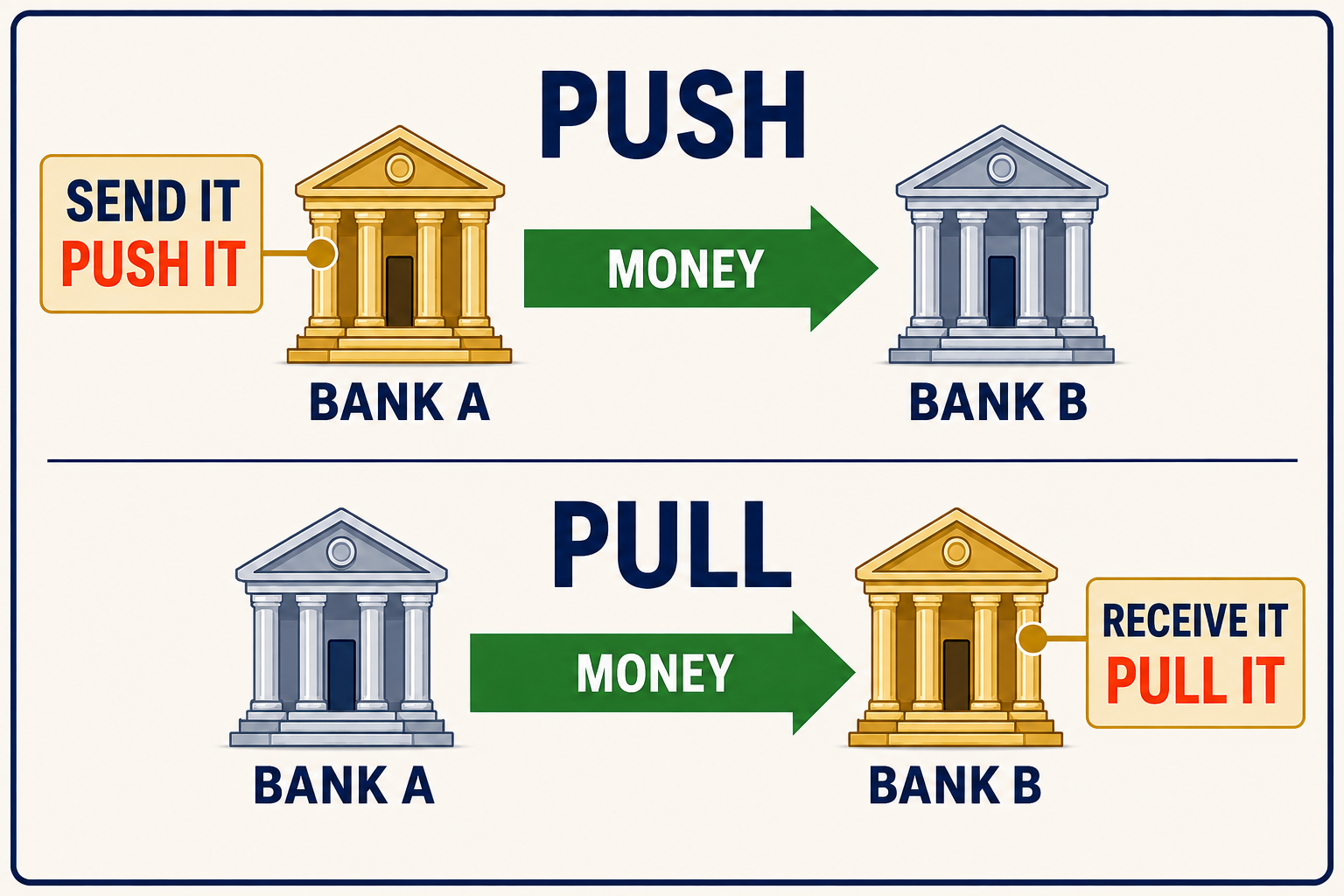
Push: tell the bank holding the money to send it.
Pull: tell the receiving bank to retrieve it.
The choice matters. Bank A’s push and Bank B’s pull may have different transfer limits, processing times, cutoff rules, and holds. The destination can remain exactly the same while the operating rules change because you started from the other institution.
Read From Both Sides
Incoming here is outgoing somewhere else.
Every institution describes the transfer from its own point of view. A transaction called “incoming” at Bank B is the same money leaving Bank A. An “ACH debit” or “withdrawal” at Bank A may be the pull you initiated from Bank B.
Do not decide direction from a nickname, a bank name inside the description, or whether you remember clicking “transfer.” Read the confirmation screen for the actual source and destination.
Direction is the transaction.
Write the route. Read the route. Say the route. Then send the money.
Do Not Learn The Screen By Habit
From and To may trade places on the next form.
ACH forms are not arranged consistently. One institution may put Move Money To at the top and Move Money From underneath it. Another may place the sending account first and the receiving account second. The words may also change to Source, Destination, Deposit To, or Withdraw From.
That means familiarity can work against you. After using one institution several times, you may expect the next institution’s form to follow the same order. It may not.
Verify the complete account—not merely the institution’s name. Confirm whether the money is leaving checking or savings and whether it is entering checking or savings. Different account numbers should help distinguish them, but you still have to read what the form selected.
Read the labels every time.
A Real-World Lesson
The system worked. The instructions collided.
The names of the financial institutions—and the amounts they were carrying—have been changed to protect the innocent.
In one real-world case, money was accidentally directed back toward an institution it had recently left. A separate transfer had also been scheduled from the source account toward the intended destination.
The first transfer could no longer be canceled. The second one still could. Catching it in the scheduled-transfer area prevented both instructions from trying to use the same funds.
In another case, a transfer was entered in reverse. Instead of sending money from the institution holding it, the instruction attempted to retrieve the amount from the wrong account. The transfer was rejected for insufficient funds. A representative explained that customers reverse ACH direction more often than people realize.
No real institutions, balances, dates, or transfer amounts are needed to understand the lesson:
You must verify which one is sending, which one is receiving, and what each balance should show afterward.
What Can Go Wrong
A duplicate commitment can cost more than aggravation.
The consequences vary. A duplicate or unfunded instruction may be returned, generate a fee, reverse a provisional credit, or bring the account under review. Build your process around preventing the error—not hoping an institution will forgive it.
Do not dispute a transfer as unauthorized merely because you sent it in the wrong direction. If you authorized it, contact the initiating institution, explain the error accurately, and ask whether it can still be canceled.
Core BankCraft Principle
Improvise. Adapt. Overcome.
ACH rarely gives every institution the same connections, limits, speed, holds, or screen layout. When the obvious route does not work, BankCraft gives you a disciplined response:
- Improvise: Find another permitted route using institutions and connections you already control.
- Adapt: Change the initiating side, use the correct push or pull, or use a tested Bridge whose limits and holds fit the job.
- Overcome: Complete the transfer safely, document what worked, and keep that route available for the next time.
Improvising does not mean firing off another transfer while the first one is unclear. Resolve the pending, held, rejected, or canceled instruction before placing the same funds on another route.
Staging documented ACH transfers within published limits is not automatically the same as structuring transactions to evade required reporting or recordkeeping. Learn the distinction—and what to ask if an institution raises the issue—in The Elephant in the Room: Routing or Structuring?
Minimum Two-Pass Verification
Do not trust yourself. Verify twice.
ACH has too many variables for memory and habit alone. Perform at least two separate checks before submitting the instruction.
Verify your written intention.
Write the sending institution, sending account, receiving institution, receiving account, account type, amount, push or pull, and the balance that should remain.
Verify the actual form.
Read every From and To label on the confirmation screen. Match the institution, checking or savings selection, identifying account digits, amount, delivery date, and expected remaining balance to what you wrote.
Trust nothing. Verify twice.
Then save the confirmation before beginning the next transfer.
Preflight Check
Before every transfer, clear the runway.
- Check the ordinary ledger. Look for pending debits and credits.
- Open the transfer system. Check scheduled, upcoming, pending, processing, and transfer history.
- Check the other institution. A transfer initiated there may not yet appear in this account’s ledger.
- Calculate the uncommitted balance. Subtract outgoing transfers that the displayed balance has not deducted.
- Write the route. Record from, to, amount, initiating institution, and push or pull.
- Verify the account type. Confirm that checking or savings is selected at both ends and match the identifying account digits.
- Read the confirmation aloud. Confirm the source and destination—not merely that both bank names appear. Complete a second pass before submitting.
- Record the confirmation. Save the date, time, amount, direction, status, and confirmation number before beginning another transfer.
- Wait for availability. Do not start the next leg until the incoming money is actually available.
Your Own Radar Screen
Keep one operating record for money in motion.
A notebook, note file, or simple spreadsheet can do what several disconnected banking screens cannot: show every active transfer in one place.
| From → To | Amount | Initiated at | Status | Next check |
|---|---|---|---|---|
| Bank A → Bank B | $1,000 | Bank A; push | Submitted | Has Bank A deducted it? |
| Bank B → Bank C | Not started | — | Waiting | Are funds available at Bank B? |
Keep full account numbers and sensitive details out of public notes and screenshots. For your private operating record, clear institution nicknames and the last four digits are usually enough to distinguish your accounts.
Frequently Asked Questions
ACH Red Zone FAQ
Why does my available balance still include an ACH I already submitted?
Financial institutions display scheduled and pending ACH transfers differently. Some reduce the balance immediately. Others continue showing the money until the transfer begins processing or posts. Check the separate transfer record before treating the balance as uncommitted.
Can I rely on the balance shown on the account home page?
Not by itself. Check pending account activity, scheduled or upcoming transfers, transfer history, and any transfer initiated from another institution. Then subtract outgoing instructions that have not reduced the displayed balance.
Does posted mean an incoming ACH is available?
Not always. A deposit may appear or post before the institution releases it for spending or another transfer. Check the available balance and any hold information before beginning the next leg.
What should I do before submitting another transfer?
Check every transfer menu at both institutions, calculate the uncommitted balance, verify the route and direction, and record the first confirmation. If a transaction is unclear, resolve it before giving another instruction against the same funds.
BankCraft Protocol
Clearing the ACH Red Zone
Treat submitted money as gone. Once you authorize an outgoing ACH, subtract it from your own working balance whether the institution does or not.
Check more than the ledger. Open scheduled, upcoming, pending, processing, and transfer history. Check both the website and mobile app until you know where each one hides the record.
Follow both ends. Track when money is deducted from the sender and when it is posted and available at the receiver.
Verify twice. Match the institution, account, checking or savings selection, identifying digits, direction, amount, date, and expected remaining balance. Do not trust the screen position or your memory.
Clear one instruction before adding another. Write the route, read the route, say the route, and save the confirmation. Do not commit the same balance twice.
Bank on My Terms provides independent educational information based on real-world experience. Transfer timing, status labels, balance displays, holds, fees, and cancellation options vary by institution and can change. Verify current terms and transfer details directly with the financial institution before moving money. This is not individualized financial advice.